Adding Hydrix to MetaMask (desktop)
MetaMask is one of the most popular Web3 wallets. Follow these steps to add Hydrix Chain to your MetaMask wallet.
Network Information
Before you begin, here are the network details you'll need:
| Field | Value |
|---|---|
| Network Name | Hydrix Testnet |
| RPC URL | https://chainfree.info:5010/validator/1 |
| Chain ID | 1337 |
| Currency Symbol | HYX |
| Block Explorer | https://www.hydrix.online |
If you experience connection issues, you can also use:
When adding Hydrix Testnet, MetaMask may display warnings about chain ID conflicts or unrecognized networks. This is common with new chains and testnets. You can safely ignore these warnings and proceed with adding the network. MetaMask shows these alerts for any custom network that isn't in their official registry.
Step-by-Step Guide
Step 1: Open MetaMask
Click the MetaMask extension icon in your browser toolbar to open the wallet.
If you don't see the MetaMask icon, click the puzzle piece icon in your browser and pin MetaMask to your toolbar.
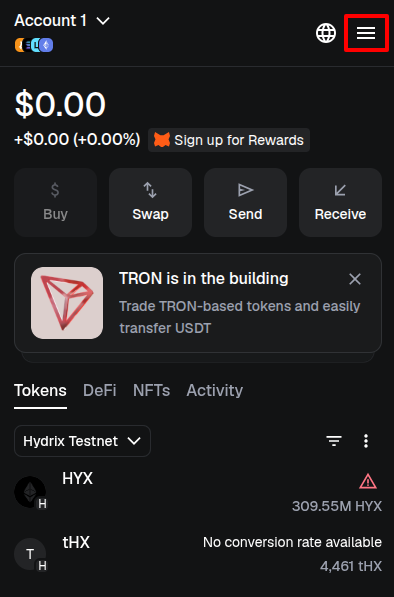
Step 2: Access Menu
Click the Menu Button at the top of MetaMask. It usually displays "as three lines".
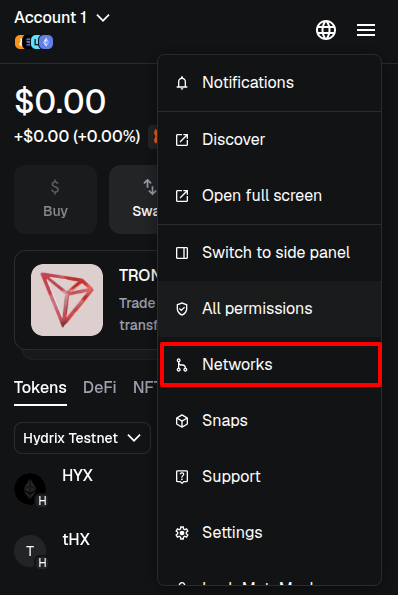
Step 3: Access Networks
In the dropdown, click "Networks".
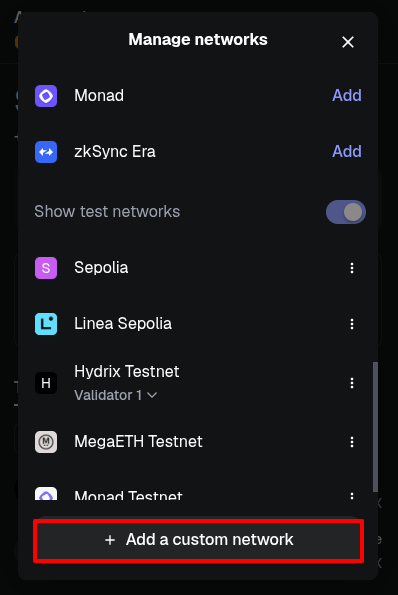
Step 4: Add Custom Network
Scroll to the bottom of the screen and click the "add custom network" button
Step5: Add Network Details
Fill in the network information form with the following Hydrix Chain details:
Network Name
Hydrix Testnet
New RPC URL
https://chainfree.info:5010/validator/1
Chain ID
1337
Currency Symbol
HYX
Block Explorer URL (Optional)
https://www.hydrix.online
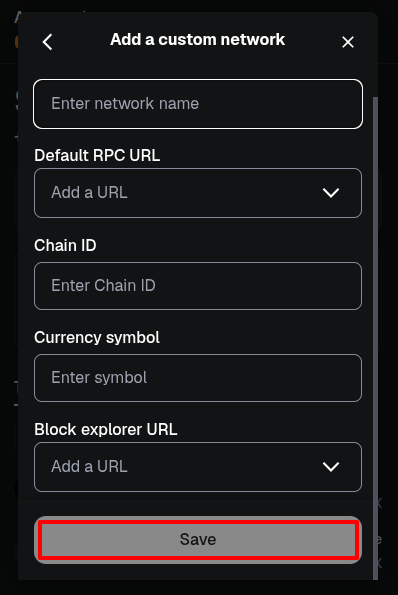
Copy and paste the RPC URL exactly as shown to avoid connection errors. Make sure there are no extra spaces.
Click "Save" to add the network. MetaMask will automatically switch to Hydrix Chain.
Step 5: Enjoy Hydix Testnet
You should now see "Hydrix Testnet" in the network dropdown at the top of your wallet.
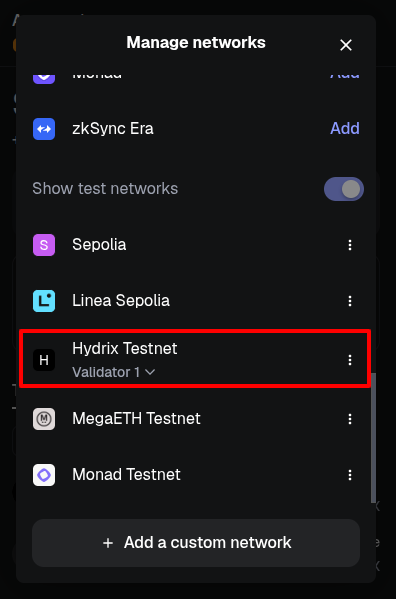
You're now connected to Hydrix Chain on MetaMask! Your HYX balance should appear shortly as the wallet syncs with the network.
Troubleshooting
Cannot Connect to Network
If you're unable to connect to Hydrix Chain:
- Verify RPC URL - Make sure it's exactly:
https://chainfree.info:5010/validator/1 - Check Chain ID - Must be
1337(not "1337" in quotes) - Test internet connection - Ensure you have a stable connection
- Try alternative RPC - Use validator/2, validator/3, or validator/4
- Remove and re-add - Delete the network and add it again from scratch
Balance Not Showing
If your HYX balance doesn't appear:
- Wait 30-60 seconds - The wallet needs time to sync
- Switch networks - Change to Ethereum Mainnet, then back to Hydrix
- Refresh MetaMask - Close and reopen the extension
- Clear cache - Go to Settings → Advanced → Reset Account (this only clears transaction history)
Transaction Failing
If your transactions are failing:
- Check HYX balance - Ensure you have enough for gas fees
- Verify network - Make sure you're on Hydrix Testnet
- Increase gas limit - Try adding 10-20% to the gas limit in advanced settings
- Wait and retry - Network might be experiencing congestion
Need More Help?
- Documentation: Visit our full documentation at Hydrix Docs
- Block Explorer: Check your transactions at hydrix.online
- Discord: Join our community for live support
- Email: Contact support@hydrix.tech
Looking for the desktop guide? Check out Adding Hydrix to MetaMask (Mobile)